Freebie Rules
Reward customers with automatic free items when they reach spending thresholds.
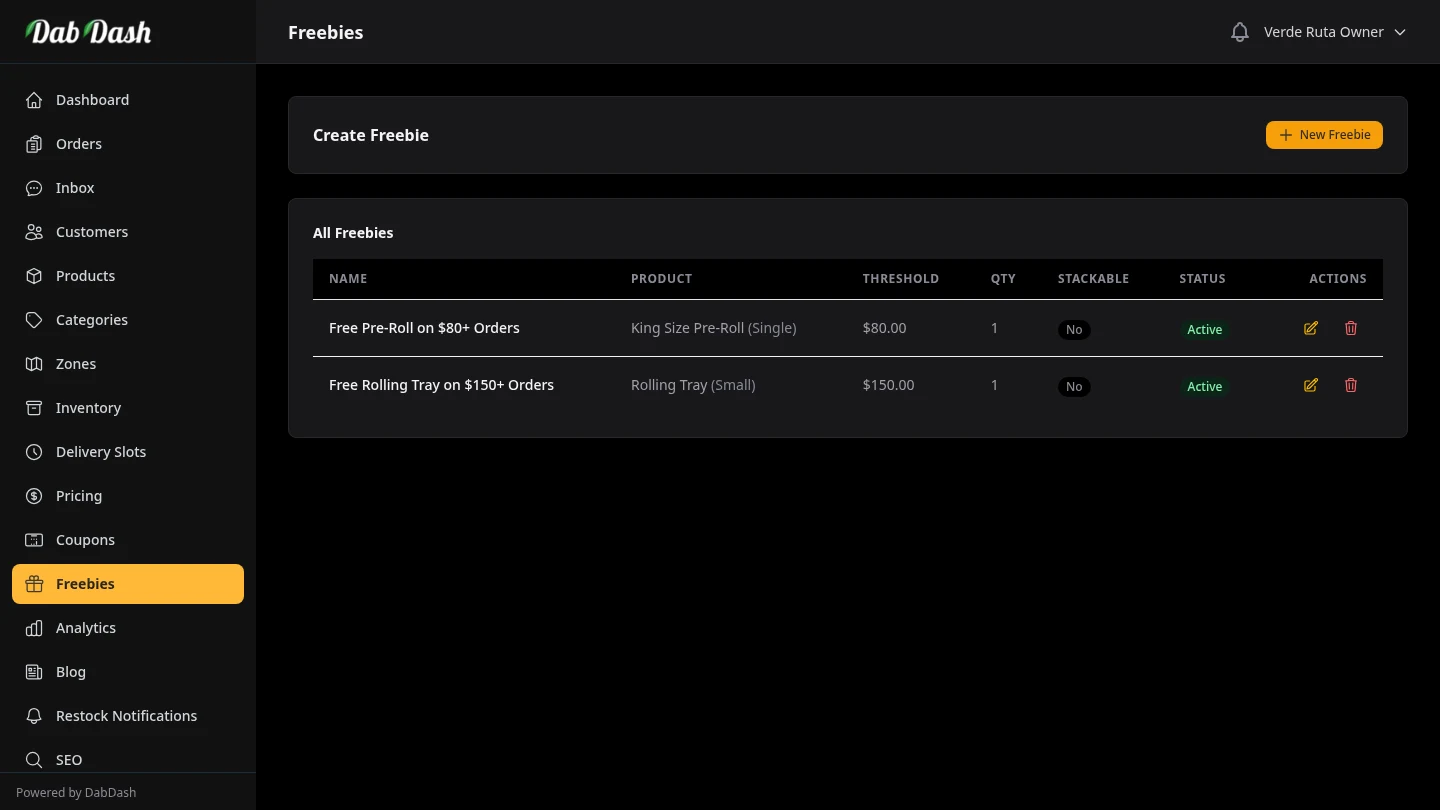
Overview
Freebies are automatic spend-based rewards — no coupon code required. When a customer's cart total reaches a threshold you set, DabDash automatically adds a free product to their cart. They don't need to remember a code; the reward appears without any action on their part.
Common uses: "Spend $50 and get a free pre-roll", "Spend $100 and get a free edible", "Spend $150 and get free papers". This strategy increases average order value while rewarding loyal customers.
Creating a Freebie Rule
Click New Freebie in the top-right corner to open the freebie form.
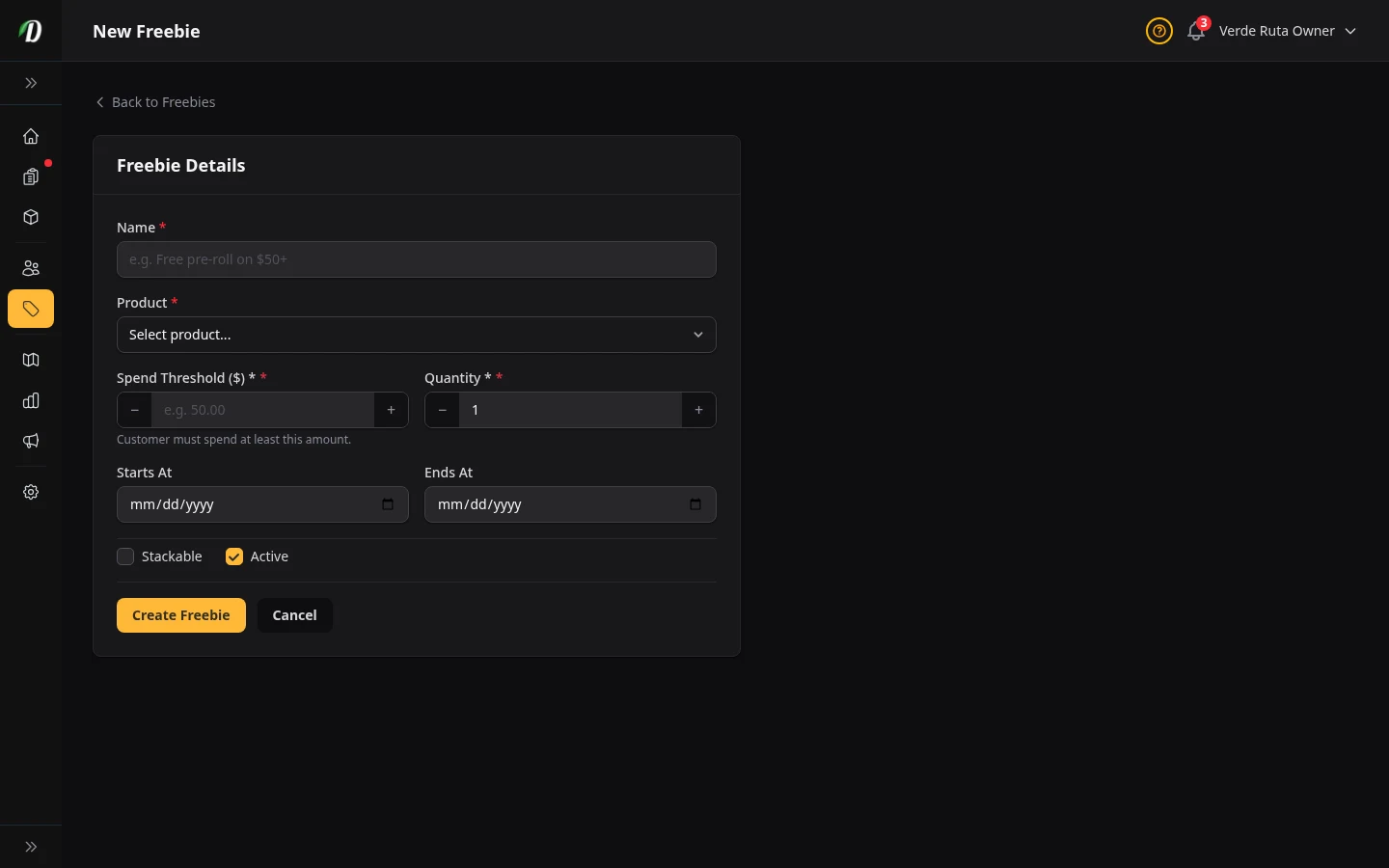
Fill in the rule details:
- Name
- An internal label for this rule — customers don't see it. Use something descriptive like "Spend $50 Free Pre-roll" so you can manage multiple rules easily.
- Product
- The product to add to the cart for free when the threshold is reached. This must be an existing product in your catalogue. If the product has variations, you can optionally pick the specific variation to gift.
- Threshold ($)
- The cart subtotal (before discounts and delivery) that triggers the freebie. Enter in dollars — for example,
50.00to trigger when the cart reaches $50. - Quantity
- How many free units to add when the threshold is reached. Typically 1. Increase to gift a multipack — for example, 2 pre-rolls.
- Stackable
- When enabled, the freebie can trigger multiple times in the same order. For example, a stackable $50 threshold rule would add 1 free item at $50, another at $100, another at $150, and so on. Leave disabled to apply the freebie only once per order regardless of cart size.
- Starts At / Ends At
- Optional date range controlling when this freebie rule is active. Leave both blank for a permanent freebie. Use dates for seasonal promotions — for example, a Black Friday freebie active only for four days.
- Active
- Switch the rule on or off without deleting it. An inactive rule never triggers regardless of date settings.
Click Save to create the rule. It becomes active immediately if the Active switch is on and the current date falls within the date range.
Editing a Freebie Rule Inline
Click the pencil icon in the Actions column on any freebie row. The row expands into an edit form directly in the table. Change any fields and click Save Changes, or click Cancel to discard changes.
How Freebies Work at Checkout
DabDash checks active freebie rules every time a customer's cart is updated. When the cart subtotal reaches or exceeds a threshold, the free product is added to the cart automatically at $0.00. The customer sees the free item listed with "Free" displayed as the price.
If the customer removes items and the cart drops below the threshold, the free item is removed automatically. The freebie always reflects the current cart state.
Freebies are applied before delivery fees are calculated. Coupon codes are applied separately and can stack with freebies — a customer can have both a coupon discount and a freebie active in the same order.
Tips
- Choose a low-cost, high-perceived-value item as your freebie — pre-rolls, papers, or a small edible work well.
- Set the threshold just above your current average order value to lift it. If your average order is $45, a $50 threshold freebie nudges customers to add just one more item.
- Use stackable freebies carefully — they can be very attractive but also expensive if your product catalogue has high-value orders. Test with a low-cost freebie product first.
- Use date ranges to run holiday freebies (4/20, Christmas, Black Friday) without having to remember to deactivate them manually.
- Keep the rule name clear for internal tracking — you may end up with 5–10 freebie rules over time and a good name makes management much easier.