Coupons & Discounts
Create percentage or fixed-amount discount codes with usage limits and expiry dates.
Overview
Coupons let you run promotions by giving customers a discount code they enter at checkout. DabDash supports three discount types: a percentage off the order total, a fixed dollar amount off, or free delivery. You can set usage limits, minimum order requirements, and optional start and expiry dates.
Customers enter a coupon code on the cart page. If the code is valid and active, the discount is applied immediately before they proceed to checkout.
Creating a Coupon
Click New Coupon in the top-right corner to open the coupon form.
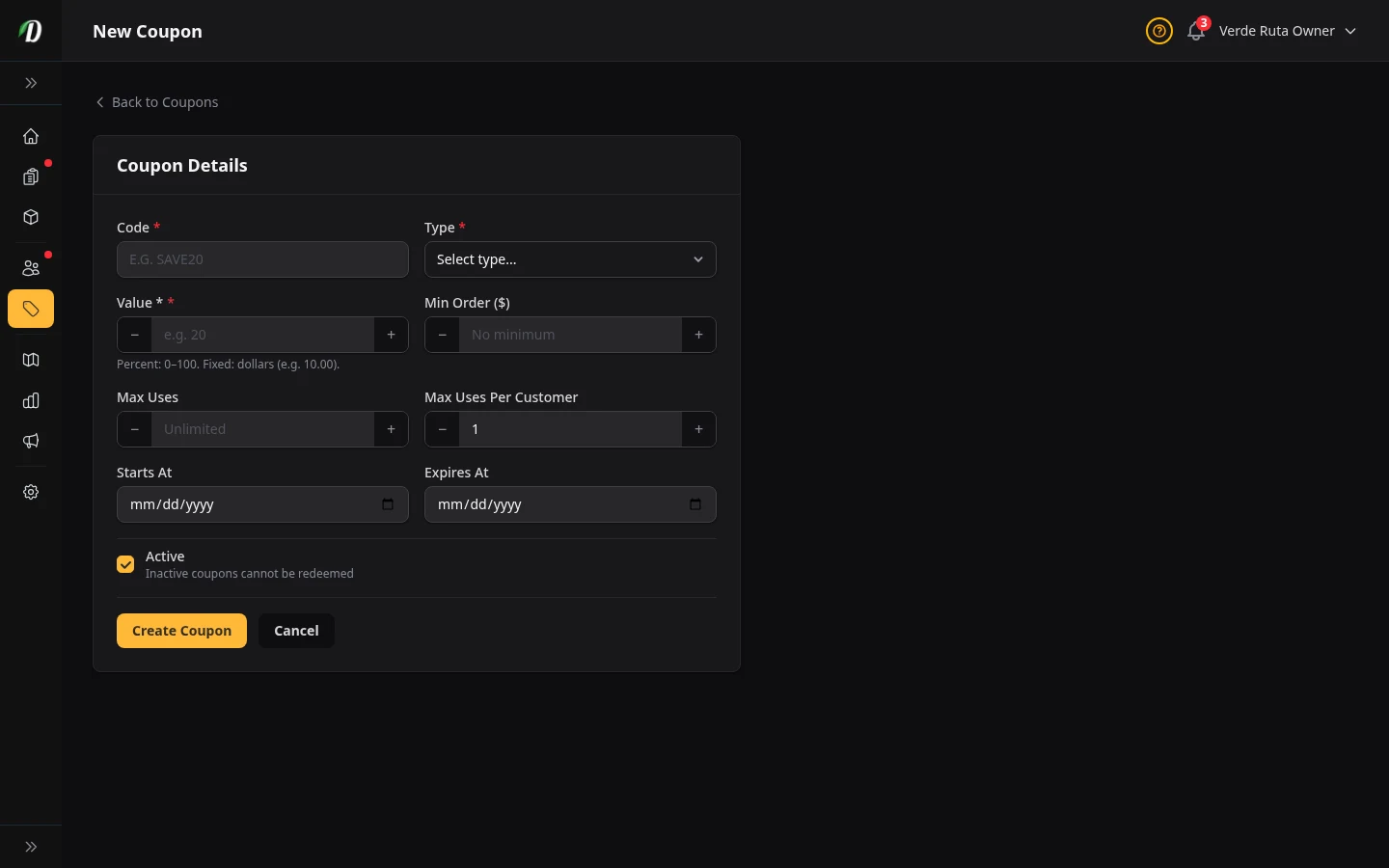
Fill in the coupon details:
- Code
- The text customers type at checkout — for example,
WELCOME20. Codes are stored in uppercase; customers can enter them in any case. Keep codes short and memorable. - Type
-
Choose one of three discount types:
- Percentage (%) — Takes a percentage off the subtotal. For example, 20% off a $100 order = $20 discount.
- Fixed ($) — Removes a flat dollar amount from the subtotal regardless of order size.
- Free Delivery — Waives the delivery fee entirely. No value field required.
- Value
- The discount amount. For percentage coupons, enter the percentage (e.g.,
20for 20% off). For fixed coupons, enter the dollar amount (e.g.,10.00). Not applicable for free delivery coupons. - Min Order ($)
- The minimum cart subtotal required before the coupon can be applied. Leave blank or enter 0 for no minimum. Useful for preventing loss on small orders — for example, require $40 minimum for a free delivery code.
- Max Uses
- The total number of times this coupon can be redeemed across all customers. Leave blank for unlimited uses. Once the limit is reached the code stops working automatically.
- Per Customer
- How many times a single customer can use this coupon. Defaults to 1. Set higher to allow repeat use by the same customer.
- Starts At / Expires At
- Optional date range controlling when the coupon is valid. Customers cannot apply the code before the start date or after the expiry date. Leave both blank for an always-valid coupon.
- Active
- Switch to enable or disable the coupon immediately. An inactive coupon cannot be redeemed even if the code and dates are valid.
Click Save to create the coupon.
Editing a Coupon Inline
Click the pencil icon in the Actions column on any coupon row. The row expands into an edit form directly in the table — no separate page needed. Change any fields and click Save Changes, or click Cancel to discard.
This inline editor supports all the same fields as the create form: code, type, value, minimum order, usage limits, start and expiry dates, and active status.
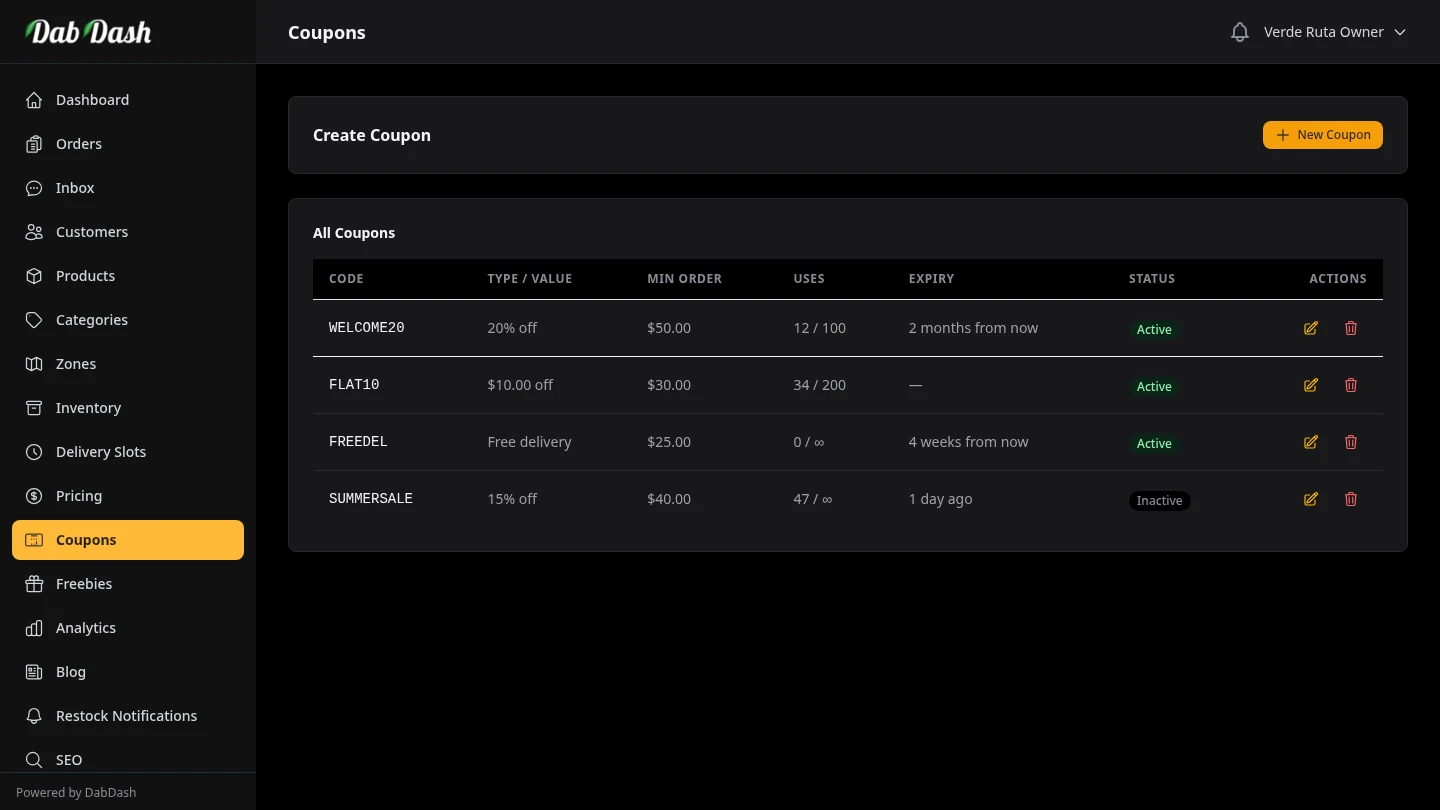
Reading the Coupons Table
- Code
- The coupon code in monospace font — exactly as customers must type it.
- Type / Value
- Shows the discount in plain language — "20% off", "$10.00 off", or "Free delivery".
- Min Order
- The minimum cart value required. Shows a dash (—) if there is no minimum.
- Uses
- Shows "used / maximum" — for example "12 / 50". Shows "∞" for unlimited max uses. Monitor this to know when a campaign is running low.
- Expiry
- Shows the expiry date in relative terms — "in 3 days", "2 months ago". Expired coupons can no longer be redeemed. Shows a dash (—) for coupons with no expiry.
- Status
- Green "Active" or grey "Inactive" badge.
Tips
- Use a minimum order on free delivery codes to protect your margins — for example,
FREEDELwith a $35 minimum ensures customers spending more always qualify. - Set an expiry date on promotional codes to create urgency. "FLASH25" expiring tomorrow converts better than an open-ended discount.
- Set Max Uses to avoid runaway promotions. A "20% off" code without a limit can be shared virally and cost you significantly.
- Use Per Customer limit of 1 for welcome/referral codes so each customer only benefits once.
- Deactivate (don't delete) expired coupons so you can review historical campaign data later.