Consolidated Billing
One Shadow checkout that tops up platform credits across every linked shop in a single batch.
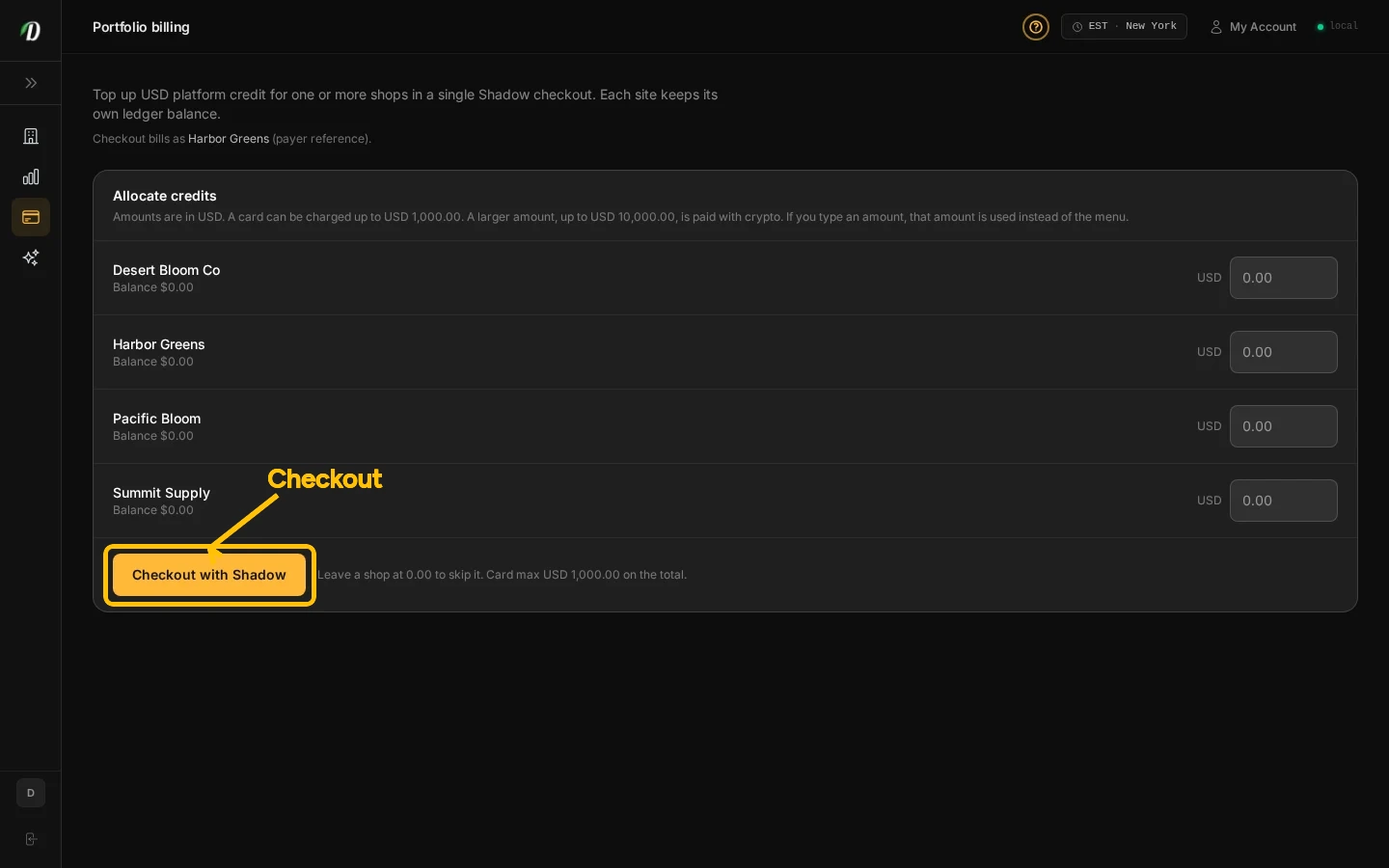
Batch platform-credit top-up
Open Billing in Dabmaster. Enter the credit amount for each shop you want to top up, then review the shop names and total. Continue to Shadow to complete one payment. Credits are added to each shop separately.
This is not a pooled wallet. Credits land on each shop separately. Single-shop top-up from a store’s own billing page is unchanged.
Check the payment status
After paying, return to Billing and check the latest top-up status and each shop’s allocation. If the payment status is unclear, check it before starting another top-up.
Guided tour
On Billing, open Help → Start tour to walk the payer note, latest top-up status, and the allocate form.
Frequently Asked Questions
Can I add platform credits to several shops at once?
Yes. Select the shops and amounts in Billing, review the total, then continue through one secure Shadow checkout.
Which shops can I include?
You can include shops assigned to your account for which you have billing access.
What should I do if checkout fails?
Check the payment status before starting another purchase to avoid submitting a duplicate payment.