
WordPress Plugin

WooCommerce stays your storefront. DabDash stays canonical.

DabDash Sync for WooCommerce keeps customer verification, loyalty balances, and marketing consent in step between the two platforms — a background job, not a login you add to your day.

Request early accessWordPress.org — Coming soonRead the API docs

The plugin source is not yet public. Use "Request early access" and we'll get you a build directly.

What it is

A hybrid model, not a migration

DabDash Sync connects a WooCommerce store to a DabDash tenant so storefront-facing flags stay honest: ID/medical/email/phone verification timestamps, loyalty balance and coupon eligibility, and marketing consent (email and SMS).

DabDash is canonical. WooCommerce may propose contact edits; it cannot forge verification or medical state. Sensitive fields — ID document images, medical record numbers, dates of birth — never land in WordPress at all.

This is a different job than the one-time WooCommerce catalog import already available in DabDash onboarding. The plugin does not sync products, orders, or inventory — it keeps customer-facing trust and consent flags aligned while your storefront stays on WooCommerce.
How it works

Four steps, once

  1. 1

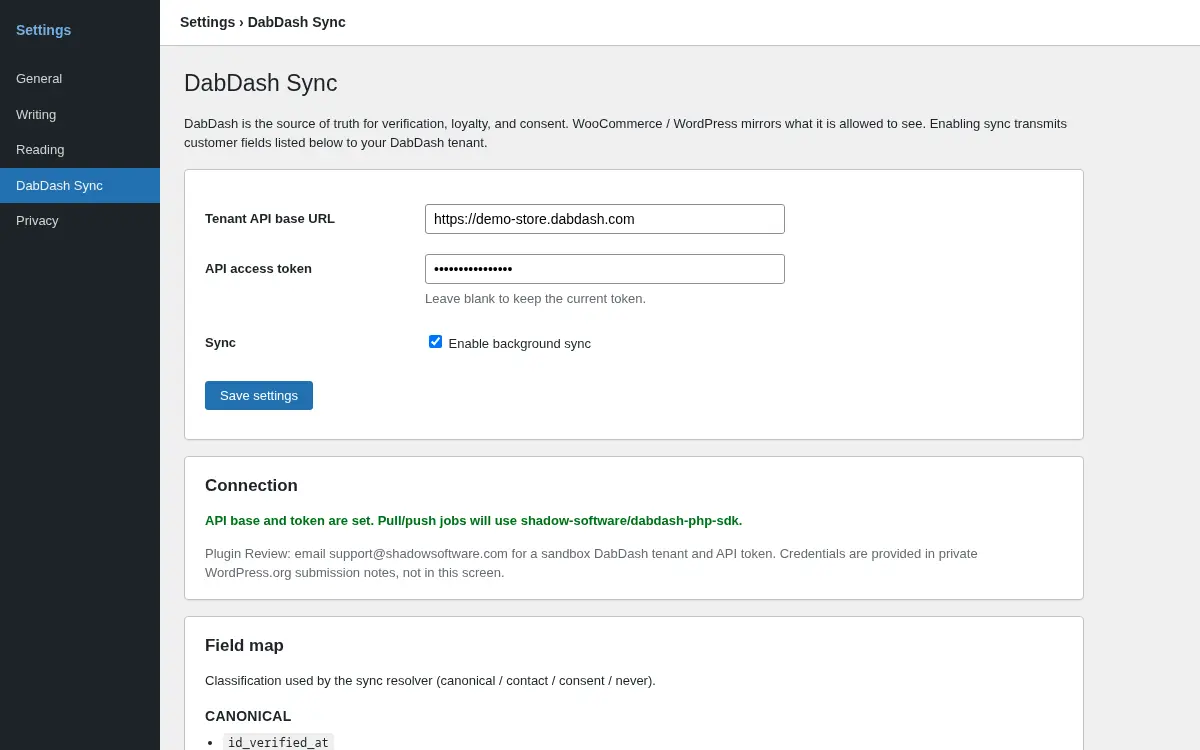
    Enter your DabDash tenant API base URL (a *.dabdash.com host) and an access token under Settings → DabDash Sync in WordPress.

  2. 2

    Review the field-map diagnostics on the same screen — canonical, contact, consent, and never-synced fields are all listed explicitly.

  3. 3

    Enable background sync once you understand what gets sent.

  4. 4

    An hourly background job pulls customer state from DabDash, links WordPress users, and queues contact/consent proposals upward whenever WooCommerce holds a newer local edit.

DabDash Sync settings screen in WordPress showing the tenant API base URL, access token, background sync toggle, and field-map diagnostics.

Settings → DabDash Sync in WordPress admin.

What syncs

The field map, plainly

Canonical (DabDash → WordPress only)

Verification timestamps and loyalty/coupon flags. WordPress mirrors these; it can never overwrite them.

Consent (most-restrictive merge)

Email and SMS marketing opt-out. An unsubscribe on either platform always wins — consent only ever tightens, never loosens.

Contact (proposed upward)

Name, email, phone. A local WordPress edit is proposed to DabDash on the next sync; DabDash decides whether to accept it.

Never synced

ID document images, medical record numbers, dates of birth, and passwords never leave DabDash or land in wp_usermeta.

Requirements

What you need

  • A DabDash tenant and an API access token, minted from Settings → AI Assistant in your DabDash admin — the same token used for MCP tools.
  • WooCommerce 8.2 or later, active on the same WordPress site.
  • WordPress 6.4+ and PHP 8.1+.

Building custom automation instead?

The plugin uses the same Tenant API every DabDash MCP tool and SDK call uses.

FAQ

Frequently asked questions

Does this sync my WooCommerce products, orders, or inventory?

No. DabDash Sync for WooCommerce only keeps customer verification, loyalty, and marketing consent in step between the two platforms. A separate, one-time catalog import is available in DabDash onboarding for vendors migrating their product catalog — that is a different tool for a different job.

What does the plugin send to WordPress?

Verification timestamps, loyalty balance and coupon eligibility, and marketing consent state — plus the DabDash customer id linked to the WordPress user. Sensitive fields (ID document images, medical record numbers, dates of birth, passwords) never sync in either direction.

What happens if a customer unsubscribes in WooCommerce?

Consent is a ratchet, not a toggle. When a customer's marketing preference changes in WordPress, the plugin stamps a local-modified time, and the next sync proposes the opt-out upward to DabDash so both platforms converge on the more restrictive value. An unsubscribe on either side always wins.

Is DabDash still the source of truth?

Yes. DabDash is canonical for verification and loyalty state — WooCommerce can propose contact and consent edits, but it cannot forge or override verification timestamps or loyalty balances.

Can I install this from the WordPress.org plugin directory?

Not yet — the directory listing is coming soon. In the meantime, request early access and we'll get you a build directly.

Do I need a special DabDash plan to use this?

You need an active DabDash tenant with an API access token, minted from Settings → AI Assistant — the same token type used for MCP tool access.

Keep WooCommerce. Add DabDash where it counts.

Start a 14-day trial to mint an API token — no plugin catalog rebuild required.

Start free trial