Saved Webhooks
Save named webhook endpoints once and reuse them for orders and email campaigns. Each webhook has its own URL, signing secret, custom headers, and test payload.
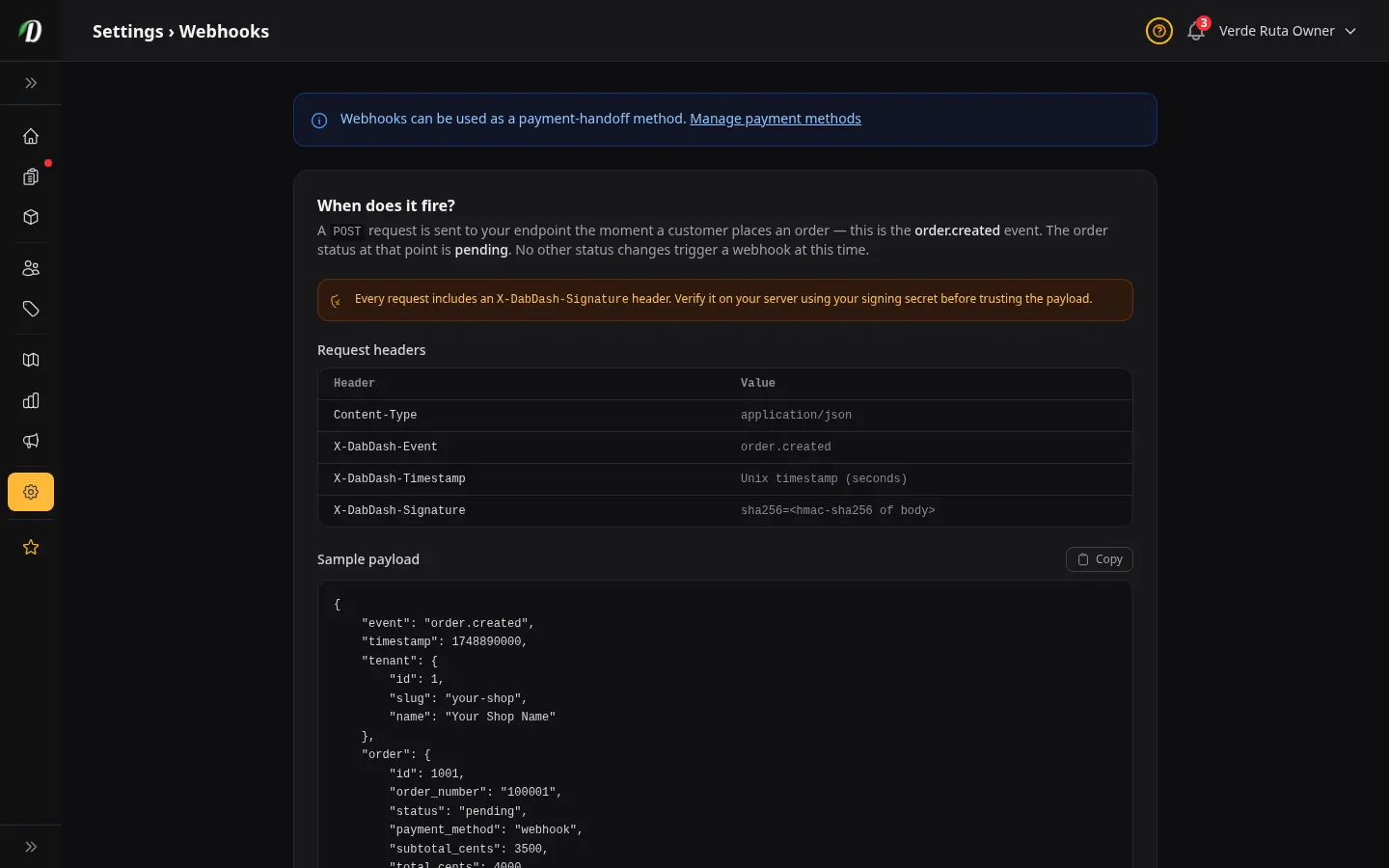
What webhooks do
A webhook is a way for DabDash to tell your own systems — your CRM, your automation tool, your custom server — the moment something happens in your store. When a customer places a new order, DabDash sends a short HTTPS request to a URL you supply. Your system reads the order and does whatever you want with it: drop it into a CRM pipeline, send a payment link, kick off a delivery dispatch, notify a Slack channel.
DabDash sends two events, and you choose which ones each webhook receives with the Send events checkboxes: order.created fires the instant an order is placed (the order is in pending status at that point), and order.shipped fires the first time you add a tracking number to an order — its payload includes the carrier, tracking number, and a tracking link. Other status changes do not fire a webhook (yet).
Endpoint URL
This is the URL DabDash will POST each new order to. It must be:
- HTTPS only —
http://URLs are rejected. - Publicly reachable — we block private IP ranges (anything on 10.x, 172.16-31.x, 192.168.x, 127.x, link-local). Your CRM must be on the public internet.
- Stable — if your URL changes, update it here. We do not retry failed deliveries beyond 4 attempts.
Health check URL (optional)
This is a simple page that returns OK when your mail tool is up. For n8n, use https://your-host/webhook/health (the built-in health page).
When you set this, email campaigns that use the webhook stop after one send error, keep checking the health page, and start again by themselves when it comes back — including trying the failed address again. Without it, campaigns still pause after three errors and wait for you to click Resume.
Active toggle
Flip this off to pause delivery without losing your configuration. When the toggle is off, no events are sent. The same toggle is mirrored on the Webhook payment method card under Settings › Payment Methods — turning one off turns the other off too.
The signing secret
Every request DabDash sends to your endpoint includes a header called X-DabDash-Signature. This header contains an HMAC-SHA256 of the X-DabDash-Timestamp header value joined to the raw request body with a dot, computed using your secret. Binding the timestamp into the signature is what stops a captured payload from being replayed later. Your server should:
- Read the raw request body before parsing JSON, and the
X-DabDash-Timestampheader. - Compute
sha256=HMAC-SHA256(timestamp + "." + body, secret). - Compare the computed value against the
X-DabDash-Signatureheader using a constant-time comparison. - Reject the request if the values do not match — that means somebody other than DabDash sent it.
- Reject the request if the timestamp is more than 5 minutes from your server's clock — that blocks replays of old requests.
You can rotate the secret at any time. The old secret stops working immediately — not after a delay — so make sure your server is using the new value before you press the rotate button.
Custom headers (Advanced)
Click Advanced to reveal the custom headers section. Some CRMs require extra headers to accept requests — for example, a Authorization: Bearer ... token, a tenant identifier like X-Shop-Id: 42, or a fixed API key. Add up to 20 name/value pairs; they ship with every webhook request.
A handful of header names are reserved and rejected: Host, Content-Type, Content-Length, and any header starting with X-DabDash- — DabDash controls those.
What's in the payload
The body is JSON. Top-level fields:
event—order.createdororder.shipped.timestamp— Unix seconds, when the webhook was prepared.tenant—{ id, slug, name }, identifying your shop.order—{ id, order_number, status, payment_method, subtotal_cents, total_cents, currency, customer, items, created_at }.order.shipping— present whenever the order has a tracking number:{ carrier, tracking_number, tracking_url, shipped_at }.tracking_urlis a ready-made link for known carriers (UPS, USPS, FedEx, DHL, Canada Post, Royal Mail, Australia Post, Thailand Post) andnullotherwise;shipped_atis ISO 8601.test— only present (true) for test pings.
Reliability & retries
DabDash retries failed deliveries with exponential backoff: 4 attempts total, with delays of 1 min, 5 min, and 15 min between them. We retry on 5xx server errors and connection failures, but not on 4xx responses — a 4xx means your endpoint accepted the request but rejected it as bad input, which is a configuration problem, not a transient failure.
After the final failure, the order continues normally — webhook delivery does not block checkout. The failure shows up on the order detail page under Payment activity as "CRM notification failed".