Driver Cash Reconciliation
Reconcile the cash your drivers collect on delivery and spot any shortfall or overage at a glance.
Overview
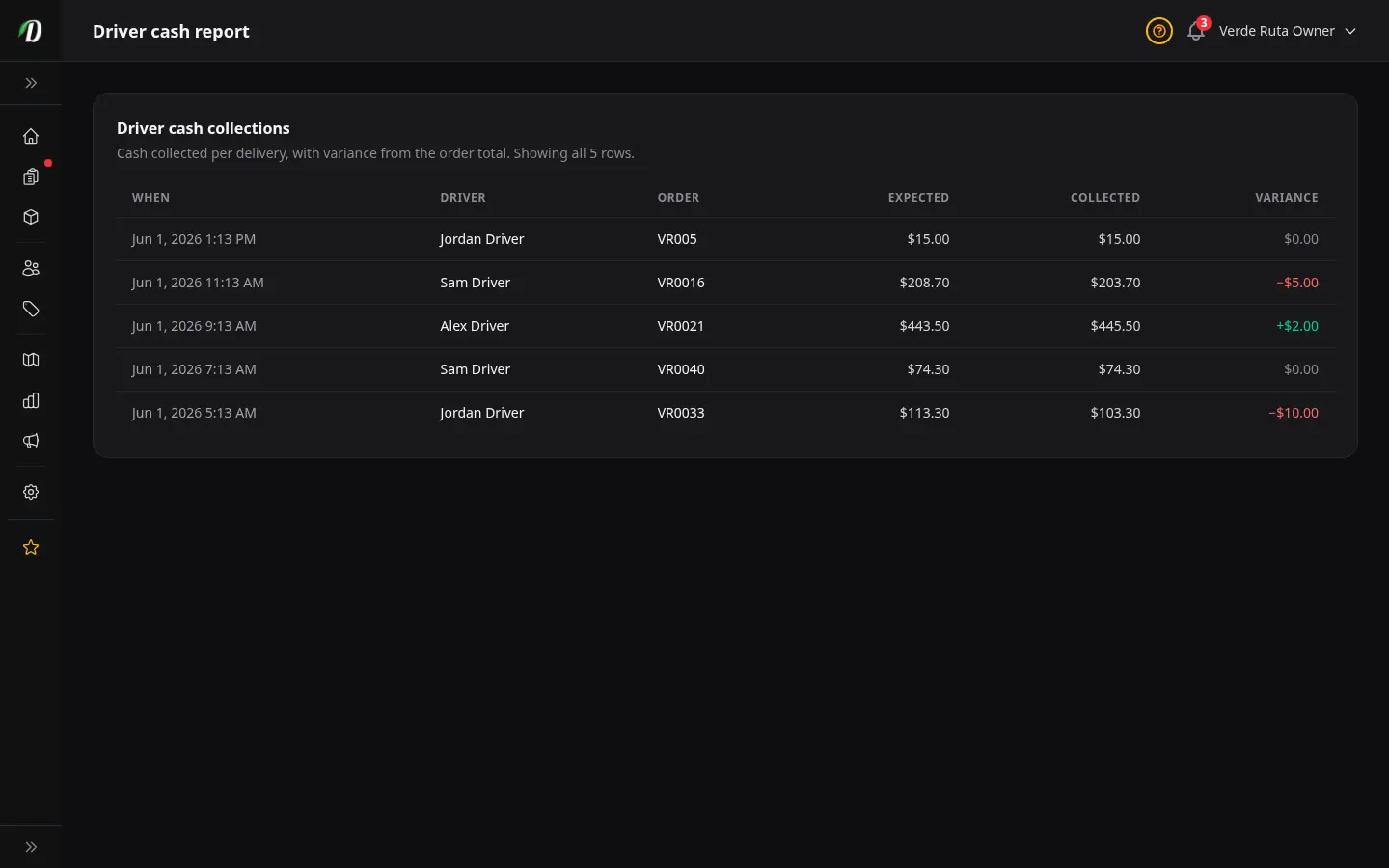
Your customers pay in cash when their order arrives. The Driver Cash Reconciliation report is your record of that cash — every delivery a driver collected payment on, with the amount you expected next to the amount they actually brought back. It is the simple way to make sure the money that left as orders comes back as cash at the end of the day.
Because it deals with money, this report is owner-only. Staff and drivers cannot see it — only the store owner can open it. You will find it under Reports, and it appears there once delivery is turned on for your store.
Think of it as your end-of-day till check. You are not chasing every cent — you are confirming the takings line up, and spotting the rare delivery where they do not so you can follow it up while it is still fresh.
Reading the Report
Each row is one delivery where cash was collected. The columns read left to right like a simple ledger:
- When
- The date and time the cash was collected, shown in your store's local time. Use it to group collections by day or shift when you reconcile.
- Driver
- Which driver collected the payment. This is who you talk to if a row needs explaining.
- Order
- The order the cash belongs to. It links the collection back to a specific delivery so you can check the details if anything looks off.
- Expected
- The order total — the amount the customer was supposed to pay. This is the figure the cash should match.
- Collected
- The actual cash the driver recorded bringing back for that order. This is what really came in.
- Variance
- The difference between collected and expected. This is the column you scan first — it tells you instantly whether a row is fine or needs a closer look. The next section explains how to read it.
Read the report top to bottom and you have the full picture of the day's cash without adding anything up by hand.
Understanding Variance
Variance is simply collected minus expected — what came back against what should have. It is colour-coded so you can read the whole report at a glance without doing the maths in your head:
- Match — the cash collected equals the order total. The variance is zero, the row is clean, and there is nothing to do. The vast majority of rows should look like this.
- Shortfall — less cash came back than the order total. This is the one to follow up on: it might be a customer who was short, change that did not get recorded, or a simple counting slip. The colour makes a shortfall stand out so it never gets buried in the list.
- Overage — more cash came back than the order total. Less common, but still worth a look — it can mean a tip was rolled in, change owed to a customer, or a mistyped figure that should be corrected.
A row in the match colour needs nothing from you. A shortfall or an overage is a prompt to ask the driver what happened — usually there is a straightforward reason, and catching it the same day makes it far easier to clear up than weeks later.
Tips
- Check the report at the end of each delivery day while the details are fresh. A shortfall is far easier to explain on the same evening than a week later.
- Scan the variance column first. Any row that is not in the match colour is the only one that needs your attention — everything else has reconciled itself.
- When you spot a shortfall or overage, use the Driver and Order columns to follow it up with the right driver and the right delivery. There is almost always a simple explanation.
- Remember the report is owner-only because it is financial. If a manager needs the day's cash position, you are the one who pulls it.
- If you do not see the report under Reports, check that delivery is turned on for your store — it only appears once delivery is active.
Frequently Asked Questions
How does cash reconciliation work in DabDash?
The Driver Cash report lists every cash-on-delivery order a driver collected, comparing what the order was worth against the cash they handed in. The variance column flags any shortfall or overage so you can follow up.
Who can see the driver cash report in DabDash?
The Driver Cash report is owner-only because it contains financial figures. Staff and drivers do not see it. It appears under Reports when delivery features are turned on for your store.
What does a variance mean on the driver cash report?
Variance is the difference between the order total and the cash actually collected. Zero means it matched, a negative number is a shortfall, and a positive number is an overage. It's an easy way to reconcile the day's takings.