Campaign Send Errors
See every failed send across your email and text campaigns, find the cause, and fix it before resending.
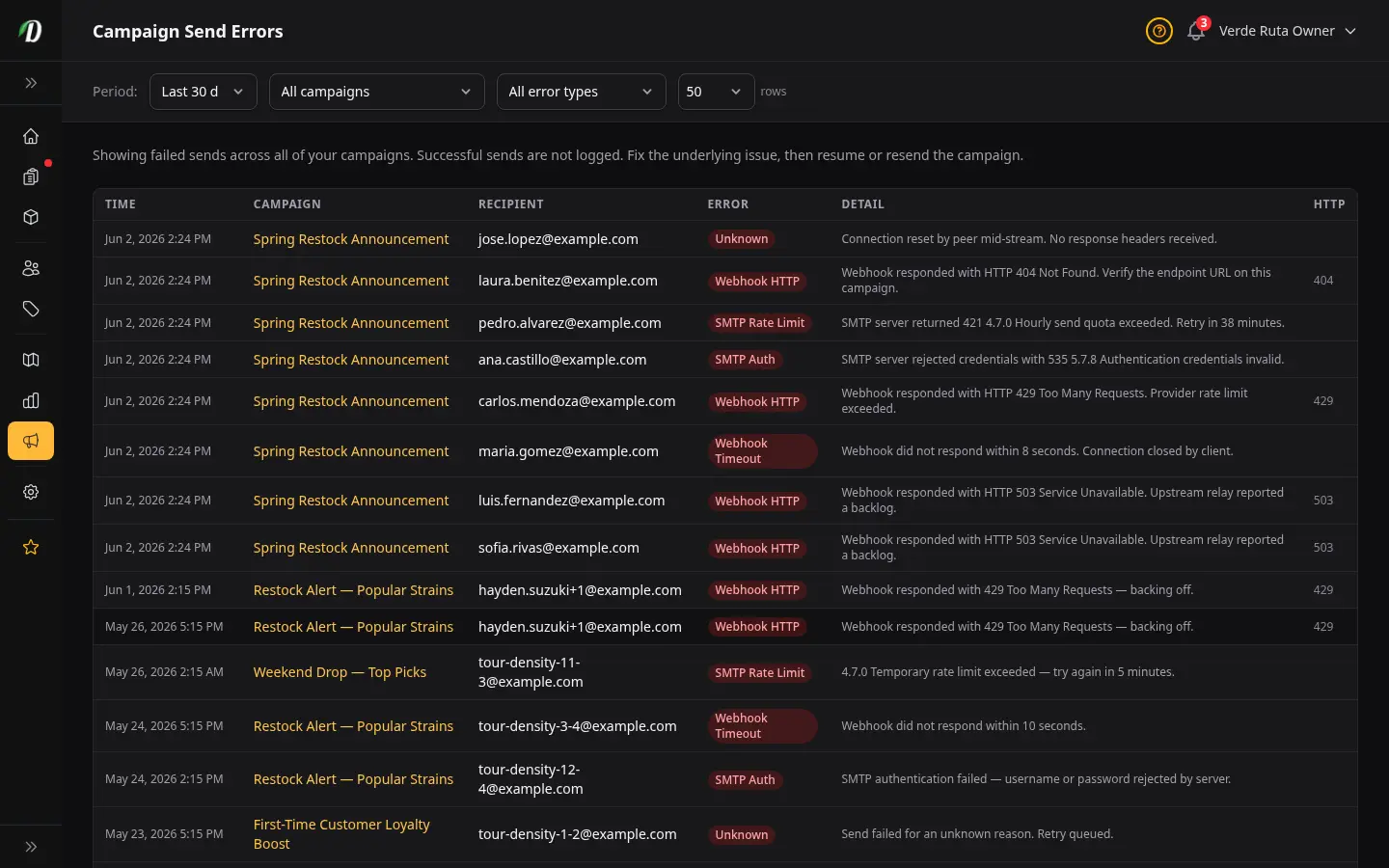
Overview
The Send Errors page shows every email that failed to send across every one of your campaigns. Successful sends are not listed — only failures appear here. Use this page to find the underlying cause of a problem, fix it, and then resume or resend the affected campaign.
Open this page from Marketing → Send Errors in the sidebar.
Filtering Send Errors
Four filters at the top of the page let you narrow the list:
- Period
- Look back 7, 14, 30, 60, or 90 days. The default is 30 days. Older errors are still in the database but hidden to keep the list relevant.
- Campaign
- Show only failures from one specific campaign. The dropdown lists every campaign that has at least one error in the database.
- Error type
- Filter by the kind of failure — SMTP Auth, SMTP Rate Limit, Webhook HTTP, Webhook Timeout, or Unknown. Use this when you suspect a single issue is causing many failures.
- Rows
- Show 25, 50, 100, or 200 rows per page. Default is 50.
Understanding Each Error Type
- SMTP Auth
- Your SMTP server rejected the username or password. Check the SMTP settings under Settings → Domain & Email and re-enter your credentials. Your email provider may have rotated keys or disabled the account.
- SMTP Rate Limit
- Your SMTP server accepted the login but refused to send because you've hit its hourly or daily limit. Lower the throttle on the campaign, or wait for the limit window to reset.
- Webhook HTTP
- Your webhook URL returned an HTTP error (the status code is shown in the rightmost column). A 4xx code usually means the request was malformed or unauthorised. A 5xx code means the receiving server failed. Check the webhook endpoint logs.
- Webhook Timeout
- Your webhook URL took too long to respond. Check that the receiving server is online and able to accept requests quickly.
- Unknown
- A failure that doesn't fit the categories above — usually a network issue or an unexpected response. Read the Detail column for the raw message.
Reading the Table
- Time
- When the failure happened, in your store's timezone.
- Campaign
- The campaign that tried to send. Click the campaign name to open it.
- Recipient
- The email address the send was aimed at.
- Error
- The error type, shown as a red pill. See the section above for what each type means.
- Detail
- A short message from the sending system. Click More to expand the full text. This is the most useful column for finding the actual cause.
- HTTP
- The HTTP status code returned by your webhook (only shown for webhook failures). Common codes: 401 = bad signature, 404 = wrong URL, 429 = rate limited, 500 = receiver crashed.
Fixing a Campaign After Errors
- Filter the page by the affected campaign.
- Look at the most common error type — that's usually the root cause.
- Open the Detail column and read the message. The fix usually lives in Settings → Domain & Email (SMTP) or on the campaign itself (webhook URL).
- Once fixed, open the campaign and click Resume if it was paused. If you see a “Waiting” banner, we are checking your health page and will start again by ourselves when it is OK — or click Resume now.
Who Can See This Page
Only staff with Marketing access can see the Send Errors page, and the list only shows errors from your own store. You will never see errors from other DabDash vendors.
Frequently Asked Questions
Where do I see failed email campaign sends in DabDash?
Go to Marketing → Send Errors in the sidebar. The page lists every failed send across all of your email campaigns with the time, campaign, recipient, error type, and a short detail message. Successful sends are not logged.
What does each campaign error type mean in DabDash?
SMTP Auth means your SMTP credentials were rejected. SMTP Rate Limit means your email provider blocked the send because you exceeded its hourly or daily quota. Webhook HTTP means your webhook URL returned an error status. Webhook Timeout means the webhook took too long to respond. Unknown covers anything else — read the Detail column for the raw message.
Can I see other vendors' campaign errors in DabDash?
No. The Send Errors page only shows errors from your own store. Each tenant is fully isolated — you will never see send failures from other DabDash vendors, and they will never see yours.
How do I fix a campaign that keeps failing in DabDash?
Filter the Send Errors page by the affected campaign and look at the most common error type. SMTP errors usually mean credentials need updating under Settings → Domain & Email. Webhook errors usually point to a misconfigured URL or an outage at the receiving server. Read the Detail column for the exact message, fix the underlying issue, then resume the campaign or duplicate it and resend.