Loyalty Points Report
See points earned and redeemed over time, your outstanding points liability in dollars, who is redeeming, and a full searchable transaction ledger you can export.
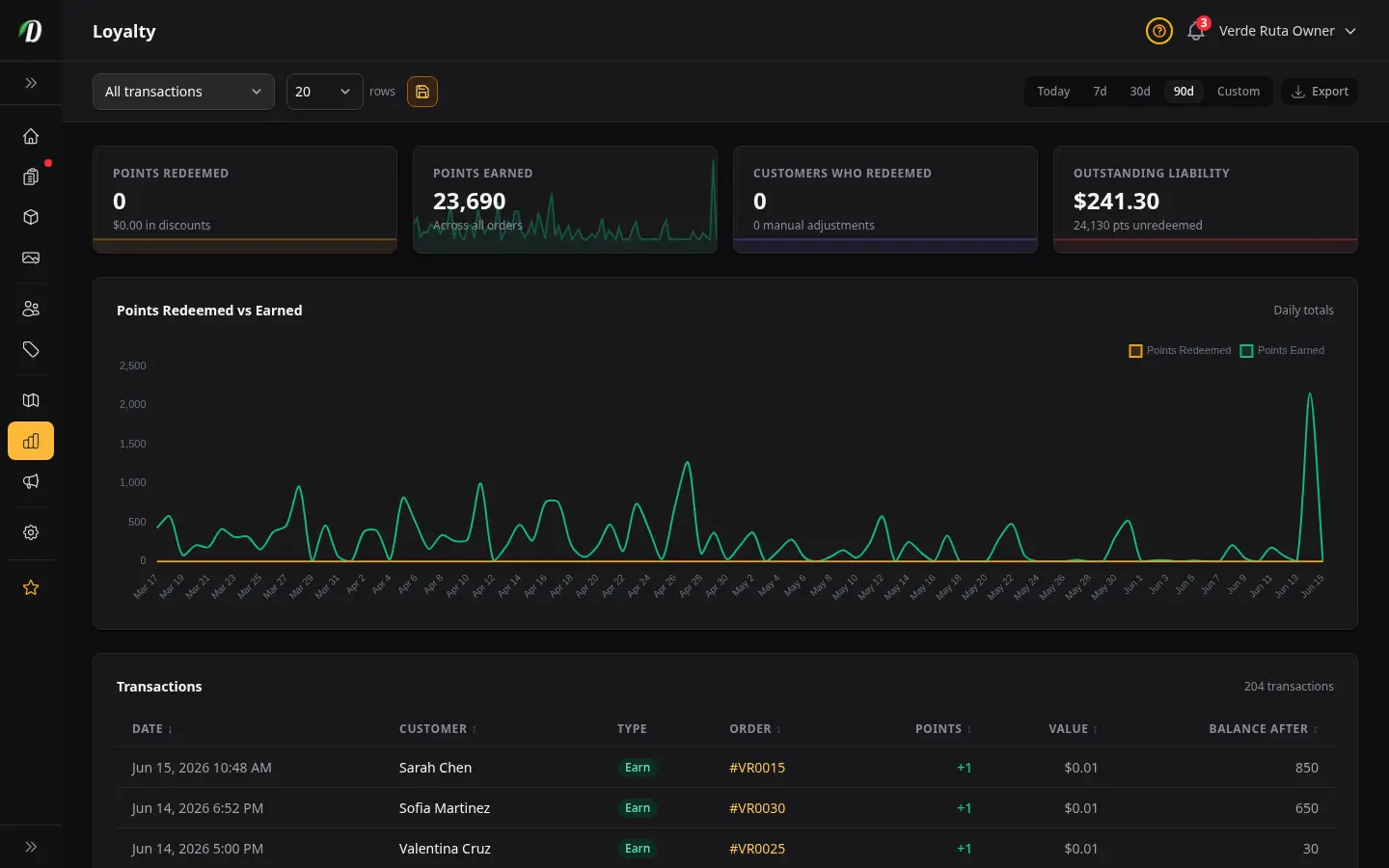
Overview
The Loyalty Points report shows how your loyalty program is performing — how many points customers earned and redeemed, what those redemptions cost you in real dollars, and how much you still owe in unredeemed points. It turns raw point counts into money you can reason about.
Use it to see whether you're issuing points faster than customers burn them, to understand the future cost of the program, and to audit every individual point movement when a customer asks about their balance.
Tip: Points convert to a discount using your redemption rate, set on the Shop Settings page — for example, 100 points per dollar. This report applies that rate everywhere it shows a dollar value.
Filters
The filter bar at the top controls what every card, the chart, and the ledger show.
- Date Range
- Use the 7 Day, 30 Day, or 90 Day presets, or pick a custom from/to range. Points earned, points redeemed, the chart, and the ledger all update to that period. Outstanding liability is the one figure that stays current rather than date-bound — see below.
- Transaction Type
- Choose All transactions, Redemptions only, Earnings only, or Manual adjustments. This narrows the ledger table to a single kind of movement so you can audit a specific category.
Stat Cards
Four summary cards sit at the top of the report. The first three reflect the selected date range; the last is always current.
- Points Redeemed
- Total points customers spent in the period, with the dollar value of those discounts shown underneath. This is what your loyalty program cost you in the period.
- Points Earned
- Total points awarded across all orders in the period. Compare this to redeemed to see whether your point balance is growing or shrinking.
- Customers Who Redeemed
- How many distinct customers spent points in the period. The number of manual adjustments you made is shown underneath.
- Outstanding Liability
- The dollar value of all unredeemed points across every customer, with the raw point total underneath. This is always current — not limited to the date range — because it represents discounts customers can still claim at any time.
Why liability ignores the date range: Outstanding points don't expire when a month ends — a customer who earned points last year can still redeem them today. Showing the live total keeps your real future cost honest.
Points Redeemed vs Earned Chart
The chart plots points earned against points redeemed for each day in the range (or each hour, when the range is Today). It's the quickest way to see the direction of your program.
- Earned consistently above redeemed means your point balance — and your future liability — is growing.
- Redeemed spikes often line up with sales or promotions, when customers cash points in.
- When there's no loyalty activity in the period, the chart is replaced with a short "No loyalty activity" message.
Transaction Ledger
The paginated table lists every loyalty transaction in the period. Click a column header to sort by that column.
| Column | What it shows |
|---|---|
| Date | When the transaction happened, in your store's timezone. Sortable. |
| Customer | The customer whose balance changed. Sortable by name. |
| Type | A short label — Earn, Redemption, Adjustment, Refund credit, Cancellation restore, or Order edit — that explains why the points moved. |
| Order | The order the transaction is tied to, when there is one. Sortable. |
| Points | The signed point change. A positive number is points earned; a negative number is points redeemed or removed. Sortable. |
| Dollar Value | The points converted to money at your redemption rate. Sortable. |
| Balance | The customer's point balance immediately after this transaction. Sortable. |
Click Export in the filter bar to download the currently filtered ledger as a CSV — date, customer, email, order, type, points, dollar value, balance, and description — for reconciliation or accounting.
Tips
- Watch Outstanding Liability over time — a steadily rising number means you're awarding more than customers redeem, which is a growing future cost.
- Filter the ledger to Manual adjustments before a review to see every hand-edited balance and the note explaining why.
- Sort the ledger by Points to find your largest single redemptions and earnings.
- If redemptions look low, consider a promotion — the chart will show the redemption spike that follows.
- Set or change your redemption rate on the Shop Settings page; this report's dollar figures follow it.
Frequently Asked Questions
What does the DabDash Loyalty Points report show?
The Loyalty Points report shows points earned and redeemed over your selected date range, the dollar value of those redemptions, how many customers redeemed, and your total outstanding points liability in dollars. A chart plots earned versus redeemed points over time, and a searchable ledger lists every individual loyalty transaction.
What is outstanding loyalty liability in DabDash?
Outstanding liability is the dollar value of all unredeemed loyalty points across every customer, calculated from your redemption rate. It is always current — not limited to the date range — because it represents discounts your customers can still claim. Track it to understand the future cost of your loyalty program.
How do I filter the DabDash loyalty transaction ledger?
Use the transaction type dropdown to show All transactions, Redemptions only, Earnings only, or Manual adjustments. Combine it with the date range, then sort any column — date, customer, order, points, dollar value, or balance — by clicking its header. Export the filtered ledger to CSV from the filter bar.
How is the dollar value of loyalty points calculated in DabDash?
Each point converts to a discount using your redemption rate set in Shop Settings — for example, 100 points per dollar. The report applies that rate to show redeemed value and outstanding liability in real money, so you can reason about the loyalty program in dollars rather than raw point counts.